certify.nz is BWOF inspection software for IQPs. You add each building from its compliance schedule, inspect its specified systems on a phone, tablet or laptop, and issue reports the building owner and council can check online.
1. Sign up
- Go to certify.nz/app/signup.
- Enter your name, email and a password.
- Choose how you work: I inspect and issue my own reports, or I don't inspect: I run the office, bookings or reports.
- You start a 30-day free trial. No card is needed to start.
2. Try the practice building
Every new account gets SAMPLE – Practice Tower. Nothing in it is real. Its reports are watermarked SAMPLE and are never emailed, so you can try every button.
- Open Buildings and tap SAMPLE – Practice Tower.
- Tap Start inspection and work through the lift checklist.
- Mark a check as a defect, complete the inspection, then review the sample report.
- When you are done, delete the practice building from the bottom of its page.
3. Find your way around
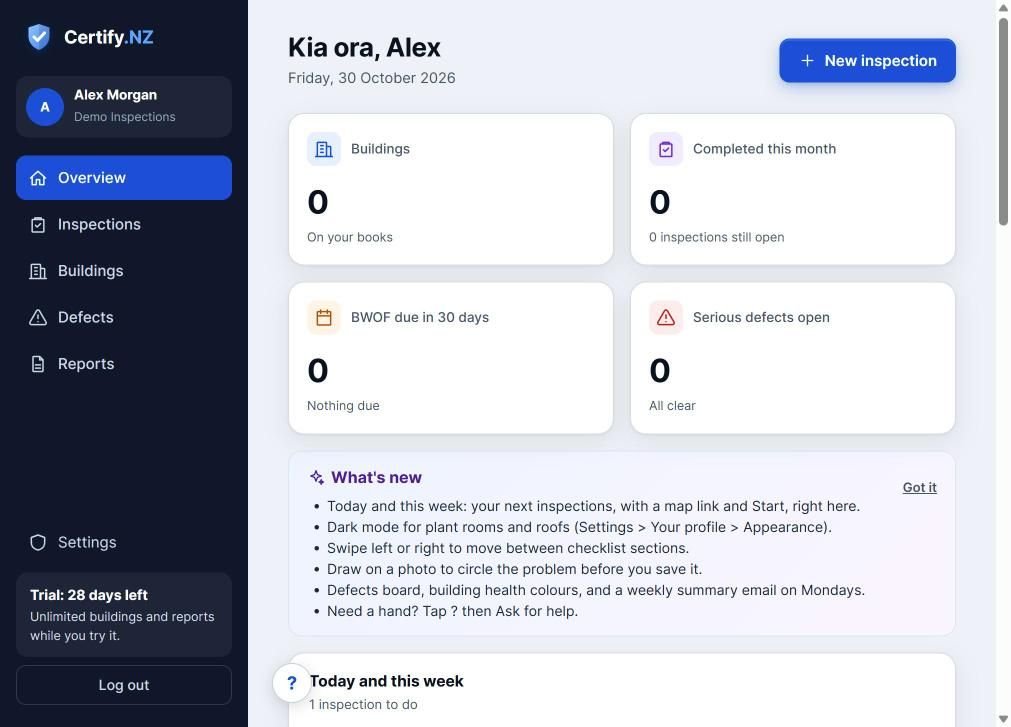
- Overview: your day at a glance, plus what is due this week.
- Inspections: annual inspections and re-inspections.
- Buildings: every building, its compliance schedule and its specified systems.
- Defects: everything that still needs fixing, across all buildings.
- Reports: every issued report, with its date, inspector and verify code.
- Settings: your details, your company, your team, checklists and your plan.
Tip: Tap ? at the bottom of any screen for tips about that page, or to ask for help.
Questions
Do I need a card to start the trial?
No. The 30-day trial starts when you sign up. You only add a card when you choose a plan.
Can I use certify.nz on my phone?
Yes. It works in the browser on phones, iPads, Surface Pro and laptops, and checklists keep working without signal.
Start your free 30-day trial and run the practice inspection.
Start free for 30 days