Features
Everything between the site visit and the signed report
Built with New Zealand IQPs for the way building warrant of fitness inspections actually happen.
What's included
Every specified system
Checklists for SS1–SS16, from sprinklers and fire alarms to lifts, backflow and fire separations. Lift checklists were built with a working NZ IQP; the rest are marked draft until your IQP has reviewed them.
Your own checklists
Customise any checklist in Settings: add or reorder checks, add readings with limits, and write guidance for your team. Past reports keep the version they used.
Last year's results
Open defects from the last inspection wait on their check, to mark fixed or not remedied. Last year's readings show beside this year's, with big changes flagged.
A row for every device
Fire doors, smoke doors, access-controlled doors and landing valves each get their own answers, and next year's list starts from this year's.
About this installation
A few yes/no questions per system hide checks that don't apply, and the report says what was left out and why.
Built for council and auditor review
A result for each system, compliance schedule procedures and frequencies, checks not carried out with reasons, and your registration on the declaration.
Works offline
Answers and photos save on the phone first and sync when there is signal. Pick up an inspection on another device.
Built for gloves and glare
High-contrast 52px buttons, a sticky section bar, "Next unanswered", and "Mark rest OK" once you have started a section, with undo.
Defects, due dates and photos
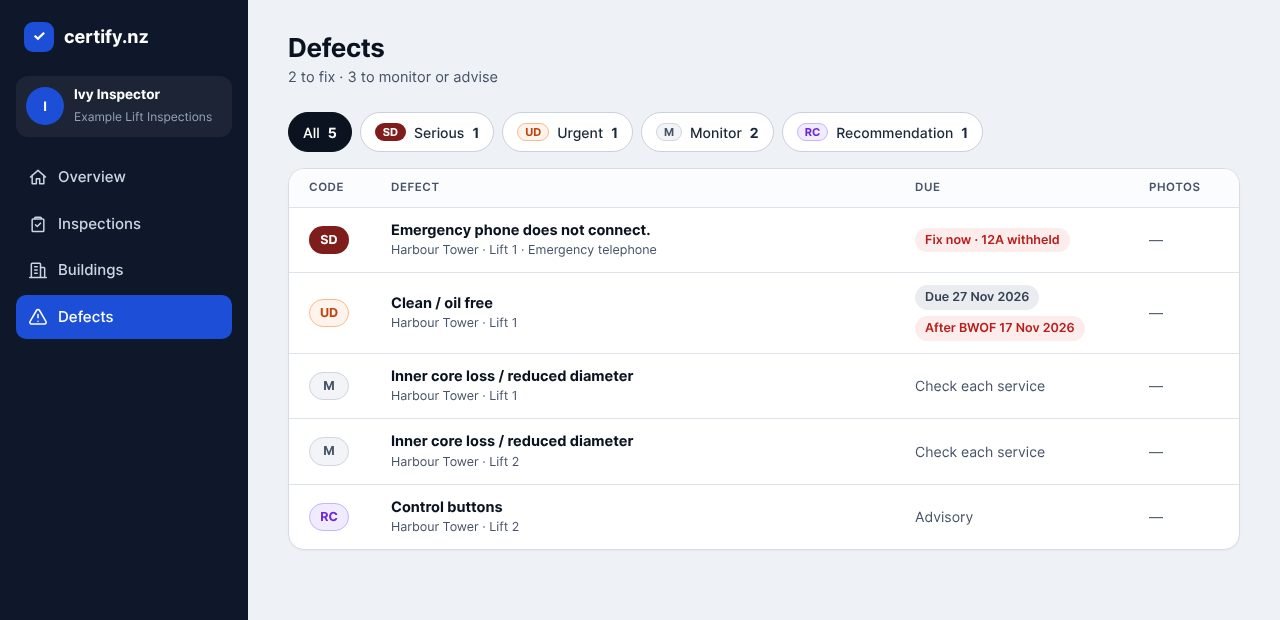
SD, UD, D, R, M and RC codes, each with its period. Photos are shrunk on the phone, stored privately and printed in the report. A serious defect flags the Form 12A as withheld; you confirm it.
Signed and verifiable
Sign with your finger or a photo of your signature. Every issued PDF is locked with a fingerprint and a QR verify code.
Email from the app
Send the report to owners and managers with the PDF attached, and keep a log of who got it and when.
Every report on file
Search every report by building, address, date or inspector, and download it with a clear file name.
Your brand
Your logo, colour and one of six cover designs. Defect colours never change, so reports stay readable.
Your team
Invite IQPs, reviewers and office staff with the right access for each.
Checklists included
Every checklist can be edited to match your compliance schedule. Drafts need an IQP's review before you rely on them.

On site
- A tab for each lift, door or device, with progress
- Guidance notes under each check
- Completed inspections become read-only, with a logged reopen
- A warning before completing a serious defect with no photo
In the office
- BWOF dates due in the next 30 and 90 days
- Every open defect across all buildings, with overdue and "after BWOF" warnings
- Reports library with versions and send log